
Education doesn’t lose its seriousness just because it becomes visual, but it does gain reach. On YouTube, lessons have to wrestle with entertainment, motivational reels, and study vlogs for the same student attention span. That’s probably why educational creators are increasingly using a YouTube thumbnail maker that can translate complex ideas into visually inviting rather than intimidating. With Dreamina, teachers, edtech brands, and course creators can turn lessons into scroll-stopping moments without turning learning into clickbait.
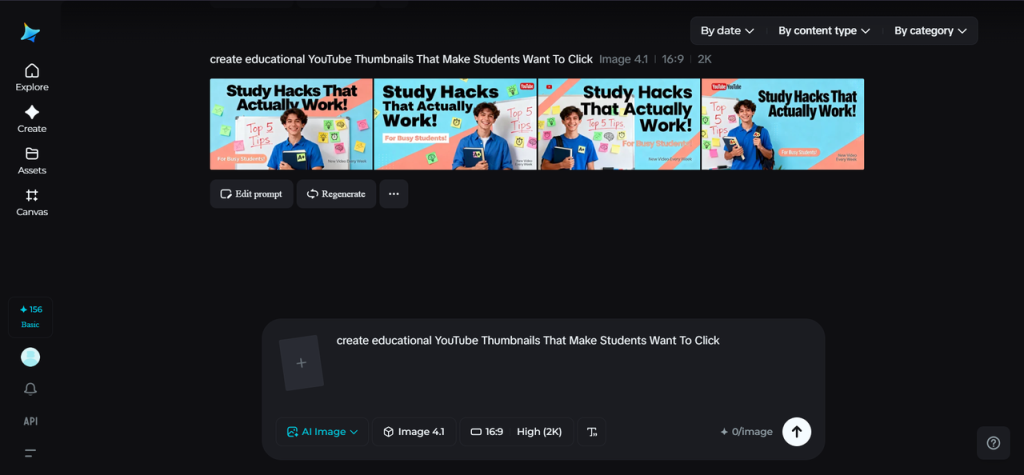
Before the commencement of learning
The thumbnail is the silent teacher standing at the door of the classroom. Before a student hears your explanation or trusts your expertise, they see one image and decide whether to enter. The most effective educational thumbnails are those that promise clarity, not confusion.
Strong learning thumbnails focus on one idea at a time, rather than dense text or cluttered diagrams. A surprised expression, a highlighted formula or a bold question can signal a lesson that will simplify something difficult. The goal isn’t to look flashy – it’s to look understandable.
Turn curiosity into a visual question
Students click when they feel the question is being asked of them. Educational thumbnails that are most popular tend to position the topic as a Problem Waiting to be Solved.
It might appear that:
-
A confused expression alongside a singular keyword, and not a sentence
-
A blurred background with one sharp concept in focus
In the case of the thumbnail posing a question visually to the viewer, the video is the answer to that question.

Teach less in the thumbnail, not more
Among the common pitfalls encountered in educational content is attempting to convey too much at once. A thumbnail replete with equations, bullet points, or words drowns viewers before they can even click on it.
Rather, it is best to control your design. Select a single symbol or element of a diagram or keyword that stands for the lesson. Such simplicity indicates that the video will structure the information without cluttering it. Teachers with a tendency to simplify the thumbnail may see an increase in the number of engagements, as students believe the video will break down effectively.
Faces still matter in learning
Faces are even present in academic texts. A teacher’s face—thinking, teaching, reacting—is a human element that makes sense of academic concepts.
For course authors and educational technology companies, facial features need not be the central point of focus in the image. They can be used as anchors:
-
Looking toward a highlighted concept
-
Expressing confidence or clarity
This puts in mind the student that there is actually a real person who is behind the tutorial, not just the slides.
Clarity trumps all other values every
Thumbnails for educational videos must be clean and easily viewed in small format. Most students view these videos on their phones, where the details will not remain clear. Hence, the importance of edits that enhance clarity over the need for special effects.
By using image upscale, images can be made sharp to ensure text, icons, and graphics are as sharp as possible, even when resizing them to a smaller size. When images are sharp, learners automatically correlate the subject matter with quality and reliability, two aspects students rate very high.
Visual consistency builds academic trust
Consider your thumbnails as a series textbook cover designs. When customers see a familiar design, they will come back more often.
Consistent elements could include:
-
Paralleling the framing of the instructor
-
Subject classification color highlights of constant recurrence
-
A pattern or layout for diagrams or keywords
As time goes by, this consistency tells the students, “This is a good explanation channel.”
Thumbnails to learning previews
A few teachers also start their preview of a lesson by creating an explanatory pictorial theme related to educating, using the AI tools provided by Dreamina. An explanation of complex terms could then be based on such pictorials related to topics like motion paths or biological processes. Once designed, such pictorials could then be developed into preview videos or avatar-based visuals to enable teachers to impart their knowledge without having to record introductions separately.
In a responsible manner, where a deepfake AI tool is utilized in internal testing or planning to mimic a host saying a neutral explanation statement, to be utilized for demonstration purposes only. The process will exclusively revolve around creating a video from a text prompt or an example picture, to enable lecturers to work on their ideas of a lesson prior to recording a full lecture without having to animate.
Design for motivation rather than perfection
Clicks often come with encouragement, not judgment. Too “perfect” thumbnails may come across as threatening. A casual phrase, pointing with a chalk arrow, or an expression of recognition, may make learning easier to absorb.
“You don’t have to know this yet. I’ll help you.” This is the best kind of educational thumbnail, and the caveat can be the winning difference.
Dreamina’s 3-step classroom for thumbnails
Creating education-related thumbnails needn’t ever be a daunting or tech-heavy process. With Dreamina, the process makes sure that is never the case, allowing a teacher to teach rather than stressing about design. These three easy steps make teaching a lesson a click magnet for students.
Step 1: Writing a text prompt
Go to Dreamina and start by crafting an elaborate text prompt for the creation of your educational thumbnail. This text prompt needs to contain the subject of your thumbnail, mood, focus, and aim of the teaching process.
Example prompt: Create an educational YouTube thumbnail featuring a kind teacher with a thoughtful facial expression, gesturing in the direction of a simplified math equation on a clean screen. Bright but simple colors, high contrast, clear text area, academic but friendly aesthetics.
This amount of detail allows Dreamina to capture your intended level of academic and visual level one.
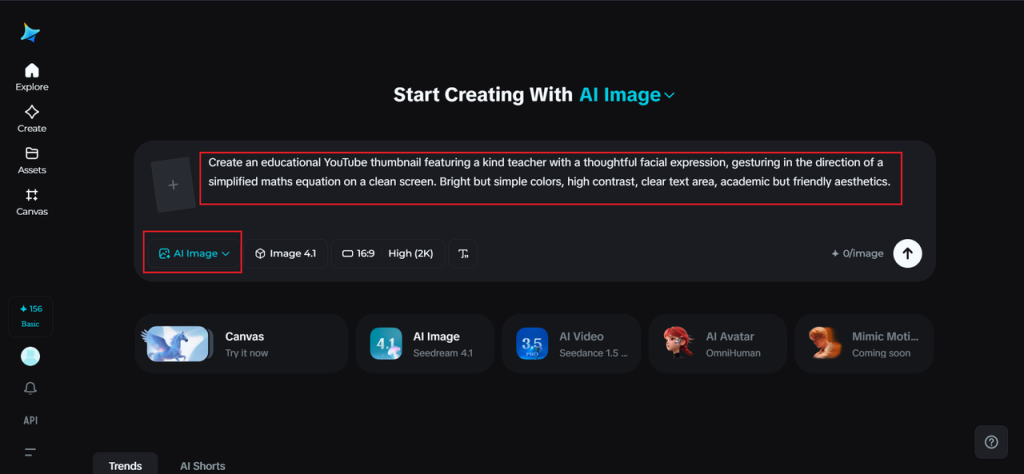
Step 2: Adjust parameters & generate
Now that your prompt is ready, it is time to modify the parameters. Select your model of choice, ensure the aspect ration is YouTube-friendly, define your size, and define your resolution to 1k or 2k depending on how clear you want your final result. Finally, select the generate icon on Dreamina to generate your thumbnail.
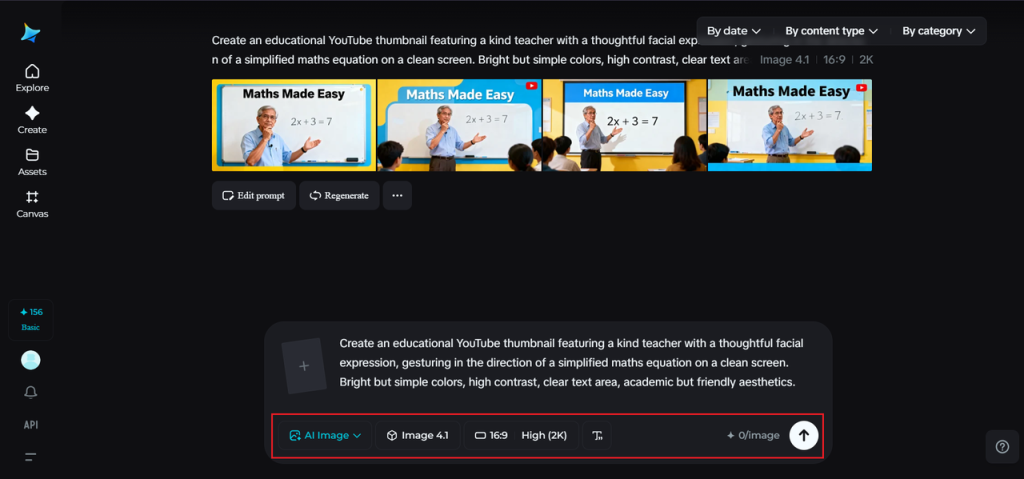
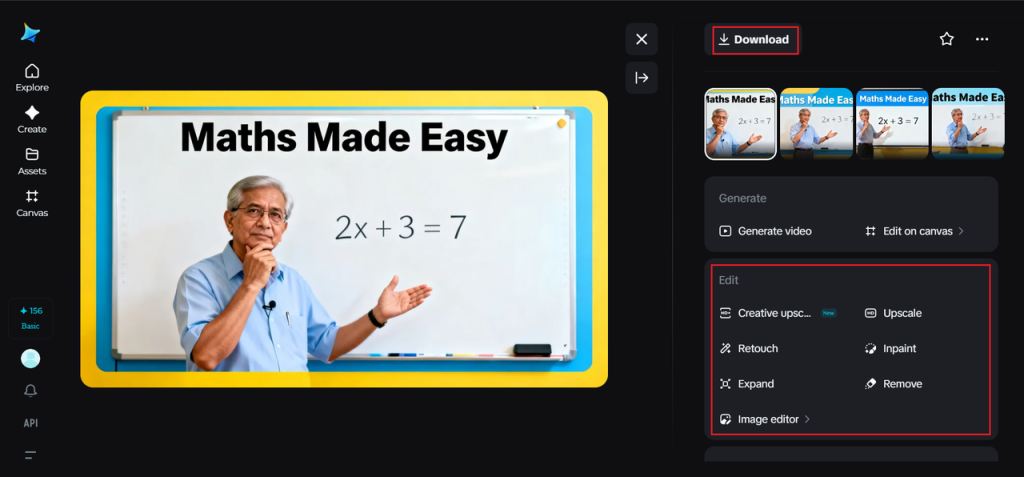
Step 3: Customize and download
Next, refine the thumbnail with the AI customization options available on Dreamina. You can make use of the inpaint option to correct small details, such as expanding the thumbnail to enhance framing, correcting distractions, or touching up details for better clarity. If the thumbnail looks sufficient for the lesson, click the “Download” icon to save the thumbnail for uploading.
The learning process is already occurring before the play button
Learning materials must get the same visual attention as entertainment. Good thumbnails do not undermine a learning experience, they invite one. With Dreamina, teachers can create learning visual elements that celebrate students’ intellect and, at the same time, their curiosity.
If you are showing that you are providing clarity, organization, and support in your thumbnail, then students click and remain, and they come back as well.
Author

Written by
Recent Posts

Chris Pontius Net Worth: The Man Who Survived Being Himself
Sandy Mahl Net Worth: The Woman Behind Garth Brooks Who Chose Silence

Tracey Walter Net Worth: The $3M Career Hidden in 200 Films

Stanley Livingston Net Worth: The $2M Exit Nobody in Hollywood Studied

Telma Hopkins Net Worth: The $4M Career Pivot Nobody Studied
Categories
- Art
- Articles
- Beauty & Skincare
- Celebrities
- Celebrities|The Chronicles
- celebrities|the-archive
- Chronicles
- Event Photos
- Events
- Fashion
- Fashion & Style
- Featured
- Food & Beverage
- Food, Spirits, Wine
- Hamptons
- Hamptons Celebrities
- Hamptons Celebrities|Celebrities|The Chronicles
- Health
- Health & Beauty
- Lifestyle
- Luxury Lifestyle
- Press
- Profiles
- Real Estate
- Technology
- The Chronicles
- Travel
- Uncategorized
- Weddings