
It can be difficult to make a short video with a certain visual style if the final product doesn’t come out the way you envisioned. You can have a good idea, well-constructed prompts, and a definite feeling in the pit of your stomach, and the resulting clip can be very different from what you were hoping for. The lighting could be different, the clothing might be different, or the camera could be moving away from the scene.
Where creative control is key, an uncensored AI video generator can come in handy. Rather than simplifying a complex concept over and over again, creators can find tools that keep the vision in mind. Some platforms like Senzia provide a way to try out video generation with AI and brainstorm ideas for video portraits, fashion visuals, and more.
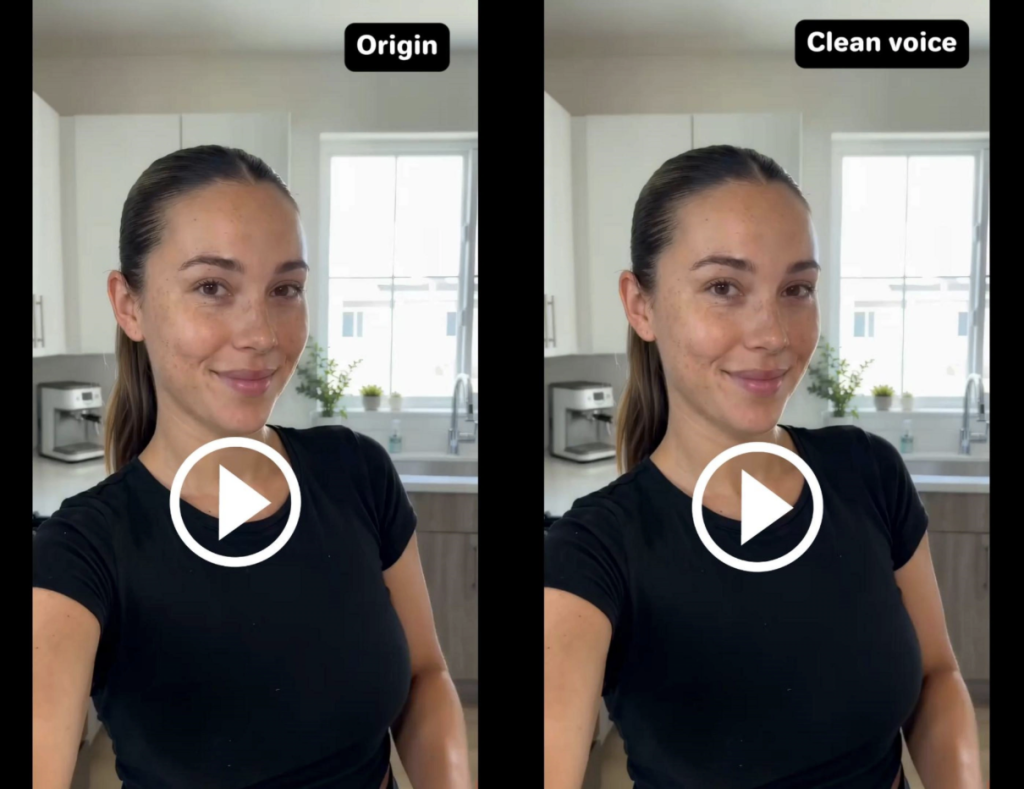
What is the point of changing your style if you’re in your mood?
A Strict Brief Still Drifts in the Wardrobe or Face
A good video prompt typically features a subject along with additional elements. It refers to the lighting, clothing, background, expression, and tone. Even when all the details are clearly explained, an AI-generated clip could still misinterpret them. An uncensored video generator can give creators more flexibility when exploring their ideas, while clear prompts help guide the final result.
For instance, a creator may want a dark fashion portrait with soft side lighting, a black outfit, and a relaxed expression. However, the generated video might change the subject’s appearance between frames or introduce brighter lighting. These variations can reduce visual consistency and make the scene feel less cohesive.
Any video generator can produce quality videos, but when you need to experiment with different concepts, a tool that follows detailed instructions can make the process easier. Descriptive text and specific visual cues can also help improve results and keep the generated video closer to the creator’s original vision.
As a rule, motion should convey that emotion, rather than replace it.
The movement should not detract from the scene, but be used to aid it. In a portrait, a slow camera move, a slight movement of the hair, or a slight change in expression can suffice to bring it to life.
But if the motion is too strong, the original composition may fall out of its effect. Creators, explain the action you want and try not to include any unnecessary actions. The aim is to achieve a natural change in the frames without losing the mood or tone of the scene.
The problem is that as the scene gets stuck, the tools are filtered.
The specific direction of light, wardrobe, and camera are made soft.
There are certain AI video platforms that impose limitations on what prompts can be given. Some descriptions might be ignored, altered, or misunderstood based on the tool.
This can be exasperating in the case of an artistic fashion video or a dramatic portrait. A detailed prompt may over the course of several revisions, become more generic, ending up very different from the initial concept.
For those looking for a more streamlined approach to exploring creative concepts, an uncensored AI video generator free online option might be attractive. But all users should check the platform’s actual policies and capabilities rather than presume their ability to get every prompt accepted.

If a Prompt is refused, it will cause the Draft to End before a Clip is made.
Keep in mind that you may get rejected a few times before finding the right approach, which can interrupt the creative process. With an uncensored AI video maker, creators can focus on refining their ideas rather than repeatedly rewriting the same description. Instead of testing camera angles or adjusting lighting, they can improve specific instructions to achieve the desired result.
The process begins with a well-defined concept that follows the tool’s guidelines and is then gradually refined. Clearly describe what is happening, where the scene takes place, how the lighting looks, and how the subjects move. This approach helps identify which instructions need improvement without changing the entire scene.
The reason why I am writing this is that a Desktop Suite is Too Heavy for One Mood Piece.
Not all projects need to be professionally edited using complicated pieces of software or a complicated production setup. A quick video for a fashion idea or a quick short video may require a simple online solution.
If you’re like someone who is trying out various concepts, an unlimited free AI video generator appears appealing. Nevertheless, there are differences between platforms regarding the use of free access, generation restrictions, export quality, and commercial use rights. It is important to review these before you get started in case there are any surprises down the road.
If an Uncensored Tool keeps the Prompt, then the Look Survives.
A brand to keep in mind
When looking for AI video generation solutions for visually oriented projects, Senzia is a brand to keep in mind. Before selecting any platform, see if they offer features that would allow you to control the prompt, keep a consistent style, and use the kind of content you want to develop.
Give a short and simple description of the clothing, setting, and lighting for a fashion scene. These details should be the same throughout the prompt to create a clear visual direction.
One Camera Change Is Enough, Because the Scene Itself Stays.
A good composed shot doesn’t have to be in constant motion. To give depth without distracting attention from the subject, try a slow zoom or a slight change in camera position.
Begin with a single “Move” command. When the outcome is more or less close to the desired style, try another version, not several features at once. This can simplify comparisons and guide creators to learn better which prompt changes are effective.
The first clip is just a draft to run again.
It may take more than one go around with AI video generation. The initial clip might set the right scene but needs the right movement or atmosphere. Make changes one thing at a time, rather than starting all over.
Those Settings Only Work If the Tool Stays Uncensored.
Subject, Setting, and Camera Are Useless if a Filter Rewrites Them
The best creative direction can come in a prompt, but it will only be of value if it is understood by the platform selected. Changing or omitting key information can make the outcome differ from the brief.
The following steps can be performed only if a softened scene has not been damaged by length, style, or motion strength.
If the prompt is unclear, varying the duration or level of motion is not enough to fix the issue. First, make sure that the subject, visual style, and setting are right. Then make adjustments to the motion and duration.
A Private MP4 Still Fails When the Mood Was Replaced Before Exporting.
This is just the last step in exporting a video. Make sure to check the lighting, clothing, subject appearance, and transitions before saving the MP4. Ensure the clip remains true to the original concept and that it does not have any visual changes it doesn’t want.
The Styled Scene Can Leave as a Private File
Use It for the Portrait, Event, or Fashion Note You Already Have
A short AI-generated video can help communicate a fashion concept, visualize an event, or present a portrait in motion. Keeping the prompt focused and reviewing each draft can make the process more efficient.
If you want to explore Senzia, review its available features and terms to determine whether they fit your project.
The Mood You Started With Is Still the Mood in the File
The best creative workflow begins with a clear idea and preserves its essential details throughout production. An uncensored AI video generator may offer useful flexibility, but prompt quality, model consistency, and platform restrictions still matter.
Whether you are creating a fashion clip, a cinematic portrait, or a short visual experiment, focus on lighting, wardrobe, and controlled motion before exporting. With careful revisions and the right tool, you can work toward a final video that stays faithful to your original creative direction.
Author
Written by
Recent Posts
The Overlooked Safety Risks at Luxury Hotels and Private Events
What Steps Should Men Follow for a Successful At-Home Hair Coloring Session?
Why a Styled Scene Needs an Uncensored AI Video Generator
Abe Wellington on Overcoming Adversity, Finding Purpose, and the Power of Connection
Overheating At Night: Practical Ways To Sleep Cooler
Categories
- Art
- Articles
- Business of Luxury
- Celebrities
- Culture
- Entertainment
- Events
- Faces of Summer 2026
- Fashion
- Fashion & Style
- Featured
- Finance
- Food, Spirits, Wine
- Hamptons
- Hamptons Celebrities
- Health
- Health & Beauty
- Lifestyle
- Luxury Lifestyle
- Press
- Profiles
- Real Estate
- Technology
- The Chronicles
- Travel
- Uncategorized
- Weddings